
About SMS verification
Optional phone verification
SYR sends a one-time code only after a signed-in user enters a mobile number and taps Send code.
Last updated August 8, 2026
CEGE Enterprises LLC operates the Say You're Real ("SYR") mobile application and sayyourereal.com.
How a user requests a code
- The user signs in to SYR.
- The user opens phone verification and voluntarily enters a mobile number the user owns or is authorized to use.
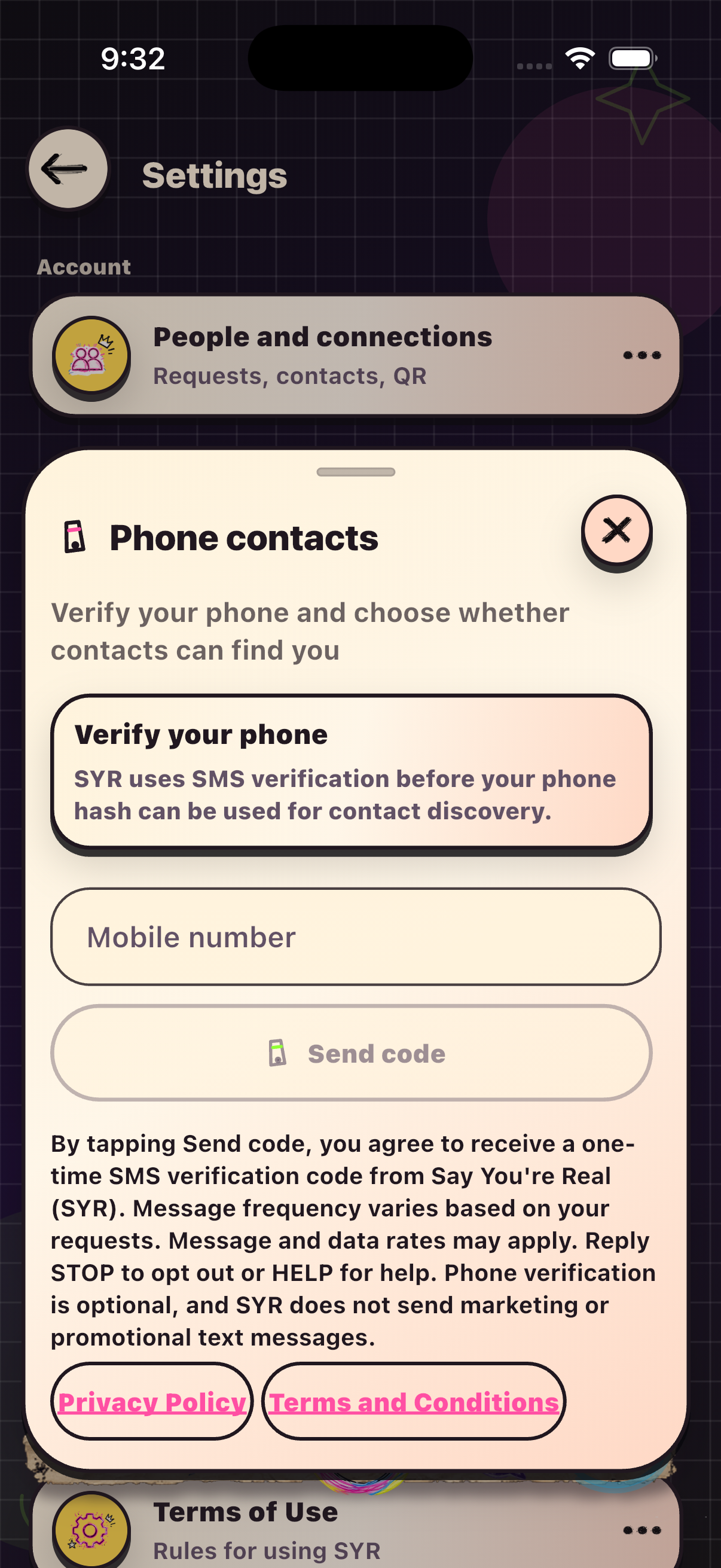
- The app displays the SMS disclosure and links to Privacy and Terms before the request action.
- The user affirmatively taps Send code.
- Only then does SYR request a one-time verification code.
- The user enters the received code to verify control of the number.
Disclosure shown before Send code
By tapping Send code, you agree to receive a one-time SMS verification code from Say You're Real (SYR). Message frequency varies based on your requests. Message and data rates may apply. Reply STOP to opt out or HELP for help. Phone verification is optional, and SYR does not send marketing or promotional text messages.
No SMS is sent before the user taps Send code. This program sends user-requested transactional verification messages, not recurring, marketing, or promotional messages. Optional contact discovery is controlled separately and requires a verified phone plus user opt-in.
Policies and help
Read the Privacy Policy and Terms. For help, use Support or email support@sayyourereal.com.